LinkedIn lead tracking for a sales team of one
Lead tracking on LinkedIn when selling is one job among several: a contact that outlives the deal, a seven-stage pipeline, and your notes beside every profile.
Look for LinkedIn lead tracking and most of what comes back is lead generation: tools that find people for you, connect with them for you, and send the first message for you, a few hundred at a time. This post is about the other half of the job. You found the person yourself, on a page you were already on. What you need now is to remember where it stands.
It is written for a particular reader: the founder looking for the first customers, the freelancer filling next quarter, the consultant working a few warm conversations. Someone for whom selling is one effort among several, and for whom the people matter for longer than the deal does.
Tracking, not generating
RolodexIn does not find leads, and it does not contact them. It reads the LinkedIn page you are looking at, saves one person per click, and never sends, connects or messages on your behalf — there is no outbound side to it at all. What the extension will and will not do on LinkedIn goes through that line by line.
So everything below assumes the hard part — deciding who is worth talking to — was yours.
A sales CRM is built around the deal
In a CRM built for a sales team, the record at the centre is the deal: an amount, a close date, an owner, a stage. The people are attached to it. That is the right shape when selling is the whole job and the pipeline is the thing being managed.
It is the wrong shape for one person, because for one person the people outlast every pipeline they appear in. The prospect who said no this spring is the intro source for next year's raise. The champion who could not get budget moves to a company that has some. What you knew about them — the note from the first call, the fact that they prefer email, who introduced you — has to survive the deal ending, or you start from nothing the next time.
That is closer to a personal CRM for LinkedIn than a sales CRM, and it is the shape RolodexIn has. The contact is the durable record: notes, tags, and where the relationship stands. The lead is a person's place in one campaign — the dashboard calls it an initiative — and a campaign ends. Closing it never touches the contact; deleting it removes the memberships and leaves every contact, note, tag and reminder exactly as it was. The person who said no keeps everything you knew about them. Why a spreadsheet stops working makes the case for that split in more detail.
Seven stages, already built
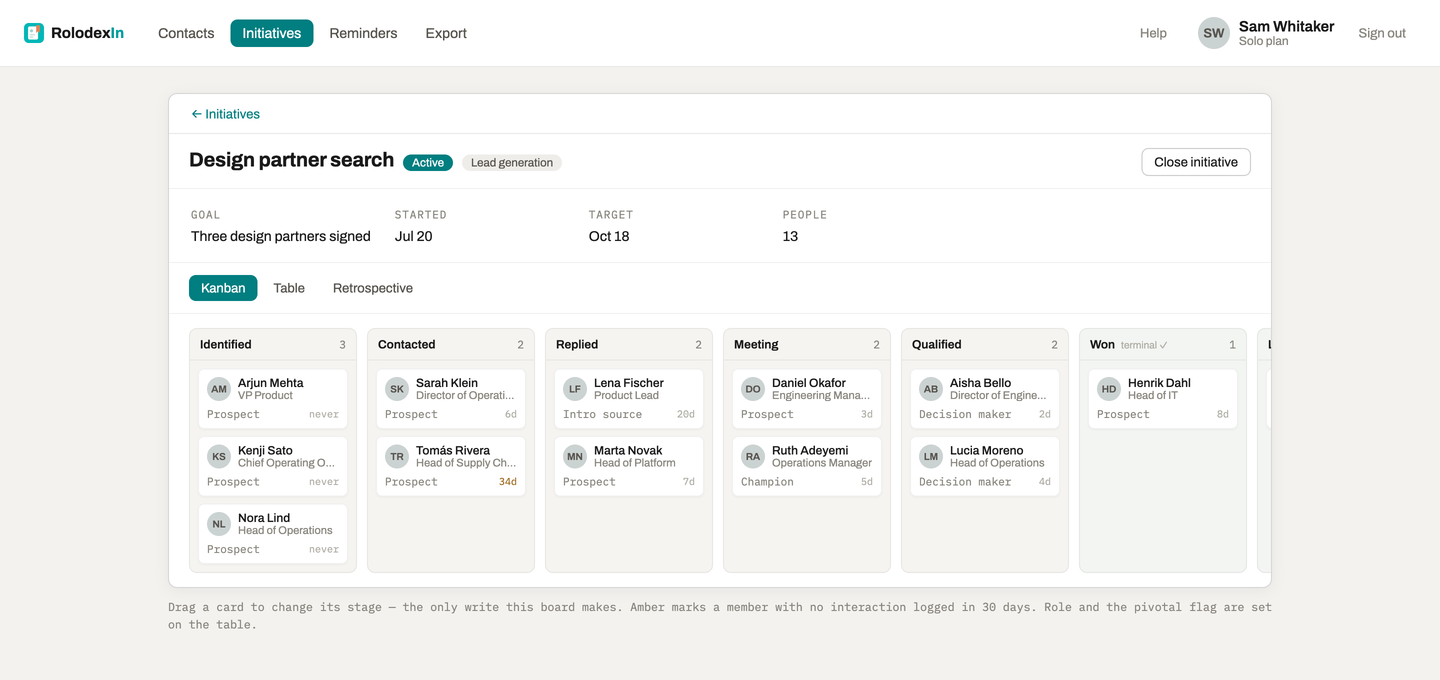
A lead-generation campaign arrives with its stages: Identified → Contacted → Replied → Meeting → Qualified → Won / Lost. The last pair are the two ways a lead leaves the pipeline, and Won is the one that counts. The board shows those stages as columns with a card per person, and you drag a card to move someone.
The same template runs a raise. Its roles include investor alongside prospect, because a fundraising round and a sales push are the same question — which conversations are live, and who opened the door? — asked of different people.
Once anything has been logged with someone, their card shows how many days ago, and it turns amber when the conversation has gone quiet. Only a logged interaction counts — a call, a message, a meeting, an intro — and dragging a card does not. Tracking LinkedIn candidates explains why that line is drawn where it is.
The champion is not the decision maker
A lead-generation campaign offers five roles: prospect, champion, intro source, decision maker and investor. They are set afterwards, in the campaign's table — adding someone is one click and asks for nothing.
The roles earn their place the first time a sale involves two people at one company, which is most of them. The operations manager who wants your product and the head of operations who signs for it each get their own row, their own stage and their own role, on the same board. The person who introduced you to both gets a row too, as an intro source, even though they will never buy anything.
When the campaign closes, the retrospective lists the people you flagged as pivotal with their roles beside them — which is how "every deal we won came through an intro, not a cold message" becomes something you can see rather than something you half remember.
Your notes, on their profile, before the call
This is the part that makes tracking leads on LinkedIn different from tracking them anywhere else: the record opens where the person is.
Open someone's LinkedIn profile and the RolodexIn panel appears beside it with their relationship status, their tags, your latest note, and every campaign they are in with their stage and role in each. Earlier notes are one click away, newest first. A note saves as you type and is filed as an entry when you click away, so the history reads as one entry per conversation rather than one per keystroke.
Two more things matter on the day of a call. The toolbar button searches your contacts from any page — your calendar, your inbox — without opening LinkedIn at all. And each contact can carry one follow-up date. When it comes due you get a browser notification at 9am, and clicking it opens their profile with your notes beside it. That needs the browser running; RolodexIn sends no email.
What a sales team would miss
It is worth being plain about the edges, because a team evaluating this would find them in an afternoon.
There are no deal amounts, forecasts or close dates on a lead. There is no shared pipeline: an account is one person's. Nothing sends email, sequences follow-ups or connects to a team CRM. If those are what you need, you need a sales CRM, and that is a reasonable thing to need.
What you get instead is a record that leaves with you. Contacts and campaigns both export as CSV on every plan, including the free one — exporting is never the thing you pay for. The free plan holds 50 contacts and 10 campaigns, and every contact counts, including people saved from a search page who never reply.