Tracking LinkedIn candidates, and the people who found them
Tracking LinkedIn candidates from a search page to a hire: one click per person, a board that shows who is going cold, and rows for the people around them.
A search for one hire touches a surprising number of people, and fewer of them are candidates than you would think. There is the referrer who knew someone. The recruiter who sends a shortlist every fortnight. The hiring manager whose calendar sets the pace, and the two interviewers whose verdicts decide it. A tracker with one row per candidate keeps the funnel and loses all of them — and they are the part you will want when the next role opens.
So this is how tracking LinkedIn candidates works in RolodexIn, from the search page to the hire, and why the people around the candidates get rows too.
It starts on a search page
Most candidates are found the same way: a LinkedIn people search, a page of results, a handful worth keeping. On that page RolodexIn's panel lists the people it can see, one row each, with a Save button — no need to open eight profiles to save eight people.
Sourcing for a role adds a second decision to every save: which search is this person for? Asked per row, that question is paid eight times on one page. So you answer it once instead. Pin a campaign from the bar at the top of the panel, and every row's button becomes Save + Add — one click creates the contact and files them into the campaign's first stage, Sourced. (The dashboard calls a campaign an initiative; it is the same thing.)
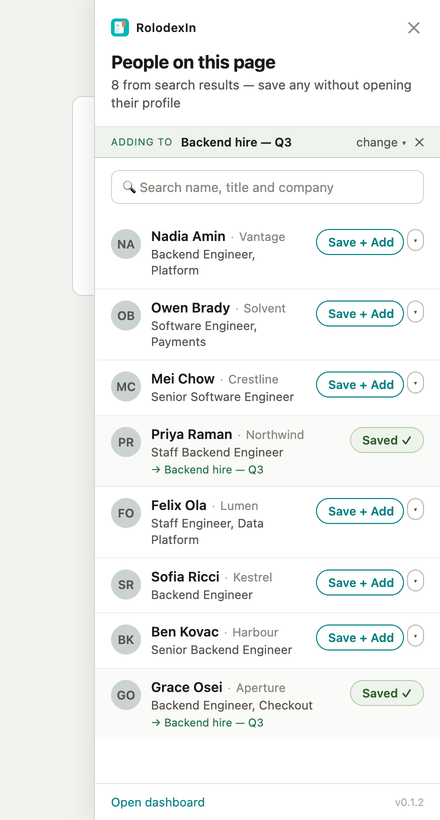
A pinned campaign is a mode, so it says so
Pinning has a cost, and it is worth being plain about. A pin is a mode, and a mode error here is silent: a person filed into the wrong campaign looks exactly like a successful save. Three things are there to catch it, and none of them is decoration.
The bar names the pinned campaign in full, and it is the most prominent thing in the panel. Every row that used the pin restates it under the person's name — → Backend hire — Q3 — so the destination is visible at the moment of the write, not only at the top. And the most recent save offers Undo, which removes the membership and leaves the contact.
The pin also clears itself when its campaign is closed, paused or deleted. A pin still pointing at a search that finished last month is the likeliest way anyone gets misfiled, so it is not left to you to notice.
Why there is no select-all
The fastest version of this screen would have a checkbox on every row and an Add selected button. It was considered and refused. A batch write is exactly the kind of LinkedIn tool this product is built not to be, and the server has no bulk endpoint for adding people to a campaign, so it is not a decision a later UI change can quietly reverse. Pinning saves you the choice of destination; it never saves you the act of picking each person. More on what the extension will and will not do.
Eight columns you do not have to design
A talent hunt arrives with its stages already built: Sourced → Contacted → Replied → Screened → Interviewed → Offer → Hired / Passed. The last pair are the two ways a person leaves the search, and Hired is the one that counts as the good outcome. The campaign's board is those stages as columns, with a card per person; you drag a card to move someone, and that is never limited by your plan.
Those stages cannot be rewritten on a talent hunt, which is deliberate — a funnel you can reorder is a funnel whose numbers you can break. Why a spreadsheet stops working makes that argument at length.
Moving a card is not talking to someone
Once anything has happened with someone, their card shows how many days ago, and once it has been quiet long enough the card is marked as going cold. That is the question a hiring search actually asks every morning: not who is at which stage but who have I let slip.
What counts as "something happened" is narrower than it might be, on purpose. Dragging a card does not count. Only a logged interaction does — a call, a message, a meeting, an interview or an intro, logged from the Log button on that person's row in the campaign's table, with a line on what happened and an optional outcome. It is dated today unless you say otherwise. If you log something late and backdate it, it does not make the person look fresher than they are; delete the latest one and the date falls back to the one before. The card reports the most recent thing that happened, not the most recent thing you typed.

Click a person's last interaction and their whole history with this campaign unfolds under the row.
The people who are not candidates
That same table is where roles are set. A talent hunt offers five: candidate, referrer, intro source, hiring manager and interviewer — the person the search is about, plus the three ways anyone else touches it: they point you at the candidate, they own the role, or they sit on the loop.
None of this is asked for when you add someone. Adding is one click and lands the person in the first stage with no role, because a form at that moment is how pipelines lose people to a sticky note instead. You fill roles in afterwards, when you are looking at the whole board rather than at one search result.
And because the role lives on the person's place in this campaign rather than on the person, the same contact can be a candidate in this search and a referrer in the next one, and neither fact overwrites the other.
When it ends
Closing a campaign offers three endings — succeeded, did not, or cancelled — and asks for an optional line on the outcome. The retrospective it lands on shows the funnel as it stood at close and, under who moved this, everyone you flagged as pivotal, with their role beside them.
That is where the non-candidates pay for their rows. "Both people who reached the final round came through referrers, not outreach" is a sentence the retrospective can only support if the referrers were on the board to begin with.
What it is not
It is not an applicant tracking system. There are no job posts, no applications, no messaging candidates from inside it, no interview scheduling, and nothing shared with a team — it is one person's account. It tracks the people you found yourself, one at a time, on the pages you were already on.
On the free plan you can run 10 campaigns, and every person you save counts towards the 50 contacts — including the ones who never reply, which is worth knowing before a big sourcing session.
How campaigns work, in detail · Saving people from search results