One-click capture
Saving people from search results, My Network and a company's people tab.
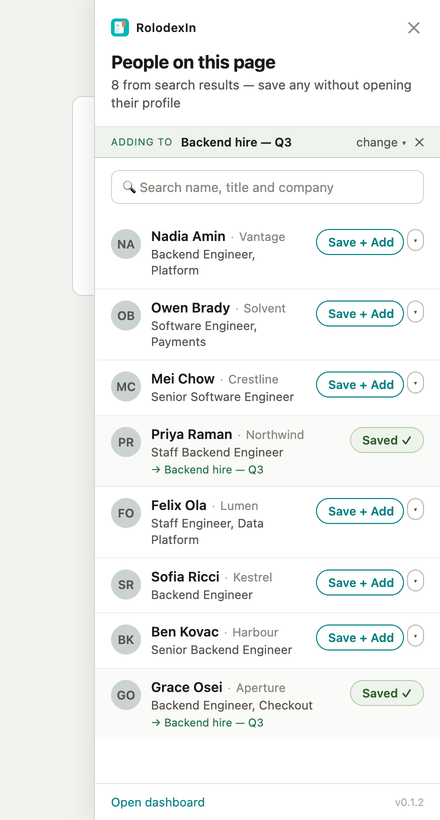
On a list of people rather than a single profile, the panel shows a capture list instead of the annotation panel: the people rendered on the page, one row each, with a Save button.
Where it appears
People search results, the All tab of search, My Network, and a company's People tab. On any other LinkedIn page the panel shows nothing.
As you scroll and LinkedIn loads more results, the list follows the page.
What a row does
A row shows the name, the headline, the company where the page gives one, and a Save button. Saving creates the same contact a profile visit would, with the status Viewed and no tags — without opening the profile, and without losing your place on the page.
Rows for people you already hold say so. That is answered from data already in your browser — a per-contact cache plus a list of your contacts' profile slugs, fetched in one request for the whole account — so nothing is asked of the server per person on the page. The search box at the top filters the people already found on the page by name, headline or company, locally, for the same reason.
What it will not do
There is no select-all, no save all, no save-on-scroll and no batch write. Every record is one deliberate click on one row. Listing someone captures nothing.
Headlines and companies are better from a profile
A list card gives a headline that LinkedIn may have truncated and usually no company at all, so records captured this way are marked internally as lower-fidelity. The first time you open that person's full profile, their name, headline and company are upgraded from it.
With a campaign pinned
Pin a campaign from the bar at the top of the panel and every row's button becomes Save + Add: one click creates the contact and files them into that campaign's first stage, with an Undo on the last one. A row can be redirected to a different campaign without unpinning.
With no campaigns on the account, no bar appears at all. See Campaigns.
When the plan is full
The panel states it once, above the list, rather than only on the row you were about to click. Chips on unsaved rows read Plan full and do nothing — the refusal is certain, so offering a retry would be worse than explaining. Rows for people you already hold keep working: a full plan does not take away the contacts already in it.