The toolbar popup
Search your contacts from any page, reopen a closed sidebar, and check your plan.
The RolodexIn button in your browser toolbar opens a small panel that works on any page, not only on LinkedIn.
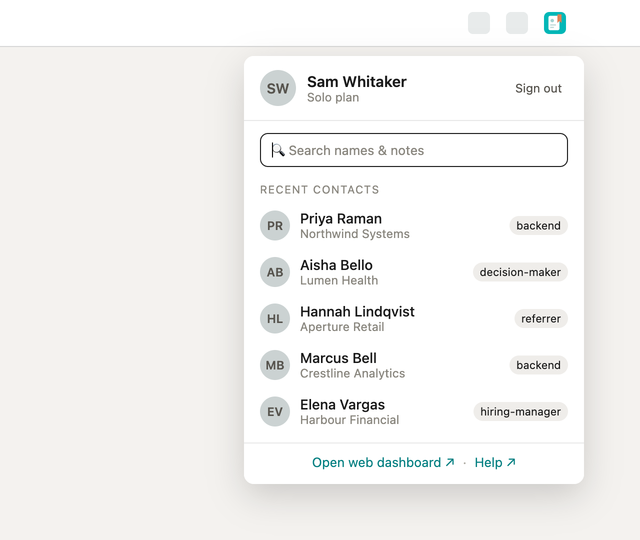
Search your whole database
The search field queries your contacts on the server — names, headlines, companies, reminder labels and the text of your notes — and a result opens that contact's record in the dashboard in a new tab. Clearing the box returns the list to your recents.
Recent contacts
Your five most recently worked-on contacts, each with their company and tags.
"Recent" means worked on, not browsed past: a contact enters the list when you visit their profile, when you save them from a capture list, and when you set a status, a tag, a note or a reminder on them. A save the plan refused does not enter it, and a contact you deleted drops out.
Reopen a closed sidebar
When the tab you are looking at is a LinkedIn page whose sidebar is closed, the popup carries an Open sidebar row. If the tab was loaded before the extension was installed or updated, it will tell you to reload the tab instead — a page loaded without the extension cannot be given it after the fact.
Sign in, and check your plan
The panel shows who is signed in and which plan the account is on, and carries sign in / sign out plus a shortcut to the dashboard. There are no settings here; nothing about RolodexIn needs configuring.