Getting started
Install the extension, sign in, and annotate your first profile.
RolodexIn is two halves of one account: an extension that annotates people while you browse LinkedIn, and a dashboard that holds the database. You need the extension to capture anyone, and the dashboard to search, filter and export what you captured.
Install the extension
Add it from the Chrome Web Store: Add to Chrome. It runs on LinkedIn and nowhere else.
One thing worth knowing straight away: a tab that was already open when you installed the extension does not have it. Reload any LinkedIn tab you had open, or the sidebar will not appear on it.
Sign in
RolodexIn signs you in with Google, and the first sign-in creates the account on the free plan. There is no separate registration step and no credit card.
You can sign in from either half — the RolodexIn button in your browser toolbar, or the dashboard — and signing into one signs you into the other without a second Google prompt. Your name and profile picture come from your Google account.
Open your first profile
Visit anyone's LinkedIn profile. The sidebar opens by itself on the right.
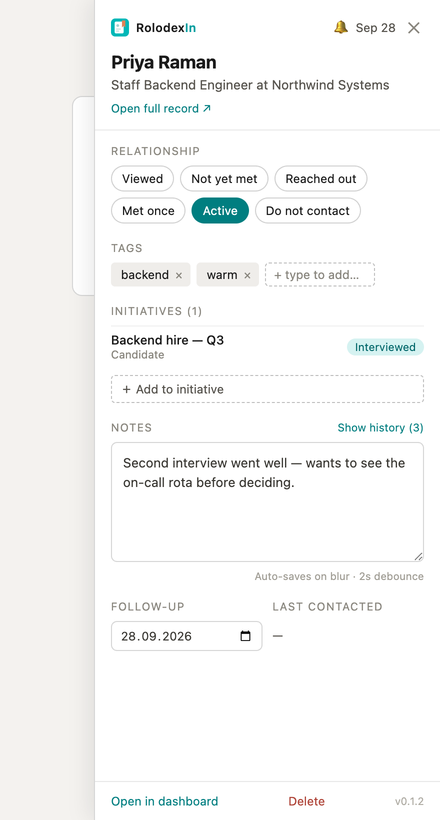
On a person you have never opened before, the panel appears immediately in a placeholder state and fills in once LinkedIn has finished drawing the page. On anyone you have seen before it is complete in a few tens of milliseconds, because it renders from a local cache rather than waiting on the network.
Visiting a profile creates the contact. The status starts at Viewed, before you have said anything about the person. That is deliberate — it is what makes "have I seen this person before?" answerable — but it also means contacts accumulate as you browse, and every one of them counts against your plan's limit. See what the numbers count.
Annotate them
Four things, none of which needs a save button:
- Relationship status — one click on a pill: Viewed, Not yet met, Reached out, Met once, Active, Do not contact.
- Tags — type a word, press Enter. There is no taxonomy to fit into; the × on a pill removes it.
- A note — type in the box. It commits as a timestamped entry when you click away, so one editing session is one entry rather than one per keystroke.
- A follow-up date — pick one and your browser notifies you when it comes due. Your browser will ask permission for that the first time.
Then open the dashboard
The sidebar's Open full record ↗ link, the toolbar popup, and https://app.rolodexin.com all land in the same place. The dashboard is where search, filters, saved views, reminders, campaigns and export live — everything that does not fit in a panel beside a profile.
If you are offline, or signed out
Neither stops you working. Edits are written locally first and queued, and the toolbar icon shows how many are waiting. A queue held because you are signed out flushes by itself when you sign in.
Where to go next
- The sidebar — every control on the panel, in order.
- One-click capture — saving people without opening profiles.
- Contacts and saved views — working the database.